
Which service belongs to whom? One place answers it.
The Service Catalog holds what each service is, who owns it, what it depends on and where it is deployed in a single record - discovered automatically from your codebase.

Screens from a running installation
The inventory is built in three steps
You do not fill an empty table by hand. AppArch derives service candidates from your connected repositories and you approve them.
- 01
Discover
Connected repositories are scanned and service candidates surface. You review the list, then import or dismiss.
- 02
Assign ownership
You give every service an owner, a criticality tier and a lifecycle state. No service stays unowned.
- 03
Connect
Dependencies, deployments, the API spec and documentation links are attached. The record is complete.
What is in a service record?
Free text is not a field. Every record carries the same fields, which keeps the inventory searchable and comparable.
Service kind
Service, API, frontend, library, worker, infrastructure or other. The fastest way to filter the inventory.
Lifecycle
Experimental, production, deprecated or retired. It tells you which services can be relied on.
Criticality tier
Tier 1 is business-critical and an outage is a major incident. Tier 3 is internal tooling and experiments.
Owner
Every service has a developer or a user as its owner. The answer to who knows this one lives in the record.
Dependencies
The infrastructure each service brings with it - PostgreSQL, Redis, Kafka - is derived from the Kubernetes resources your deployment source reports, with the resource that gave it away shown as evidence.
Deployments
Once Argo CD, Flux or Kubernetes is connected, which version runs where becomes visible in the catalog.
API spec
The OpenAPI spec is attached from the repository, from a URL or by hand. Title, version and endpoint count land on the record.
Links
Documentation, runbook, dashboard, on-call rota, repository and API links sit next to the service.
Gold, Silver, Bronze: what a service is missing
Every service is checked against the same list. A check that does not fit the service, like an API spec for a library, is left out instead of counted against it.
- Gold100%
- Silver≥ 75%
- Bronze≥ 50%
- No level< 50%
- Scanned in the last 30 daysif a project is linked
- API specservices and APIs
- Deployednot libraries
- On-call linkTier 1 only
Where a service record gets its data
You fill in the owner and the links. Everything else is read on a schedule and stays current on its own.
- Argo CD · Flux · Kubernetes
Deployments
Every 10 minutes: version per environment, sync status, health, and the databases, caches and queues the service ships with.
- openapi · swagger
API spec
Found in the repository by name (root, docs, api, spec), fetched from a URL or pasted by hand. Refreshed hourly; a failed refresh keeps the last good copy.
- ArchScan
Linked project
The last scan date and score of the scanned project behind the service.
- Filled in by you
Owner, tier, lifecycle, docs, runbook, dashboard and on-call links.
When do people actually open the catalog?
An inventory is not an end in itself. It earns its place in three moments.
A developer joins the team
How many services exist, what each one does, who to ask. One list instead of a week of hallway explanations.
On-call during an incident
The owner, the runbook link, the criticality tier and what it depends on, all on one screen. You get back the minutes normally lost to searching.
An architecture review
How many experimental services slipped into production, which Tier 1 service has no owner, which one never reached a Gold scorecard. The questions rest on data.
Frequently asked
Do I have to fill the catalog in by hand?
Where does the deployment information come from?
What do the catalog's dependencies show?
Which plans include the catalog?
Where is our data kept?
See it in the product
All screenshots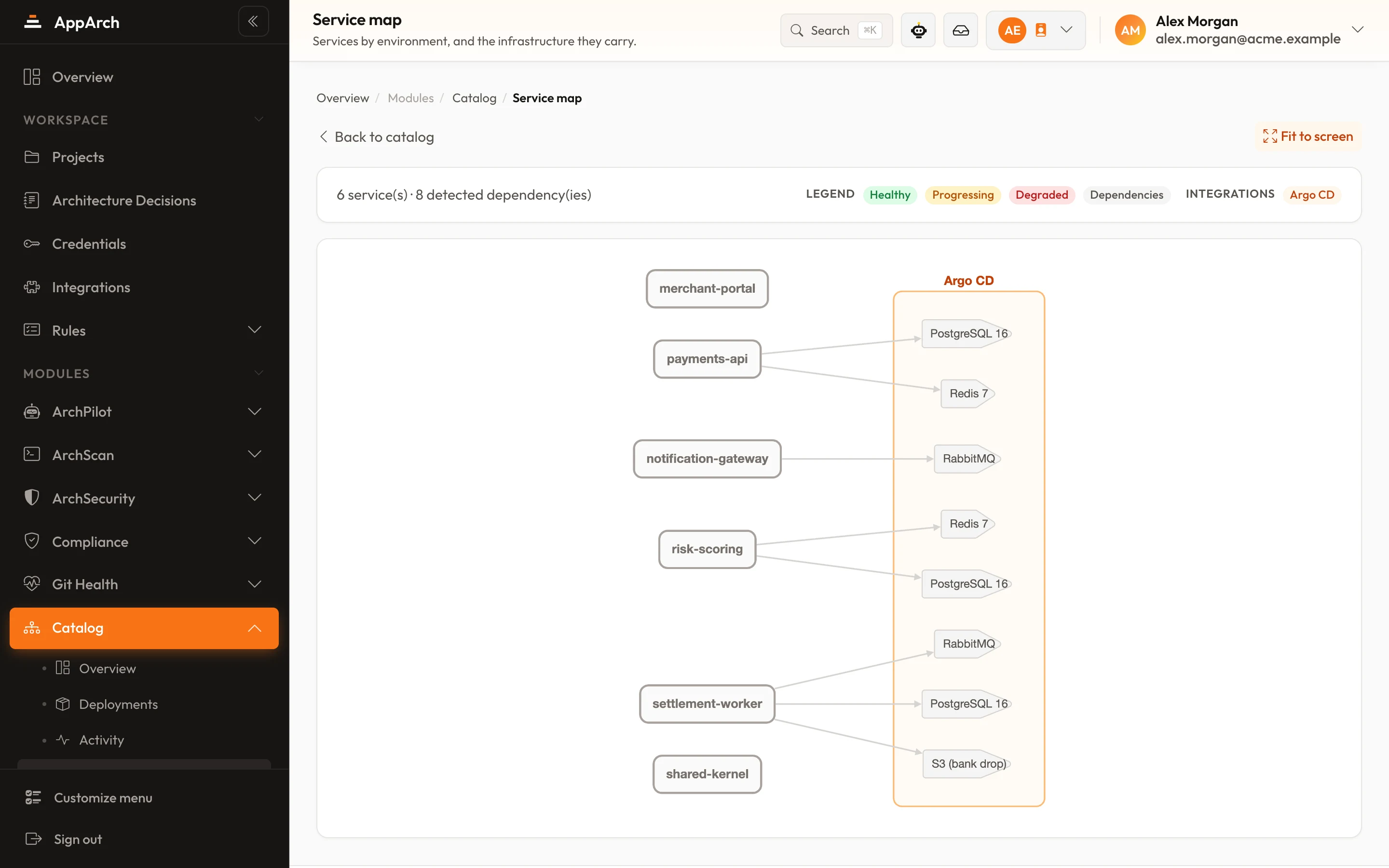
Build your inventory in an afternoon
Connect your repositories, approve the discovered services, assign owners. The rest keeps itself current.